# 5 Things a Web Developer Must Know
Until we die, we are all students. Every now and then, we are taken aback by something new that we were previously unaware of. This encourages us to continue learning. This is especially true for web development technologies such as HTML, CSS, and JavaScript.
But -
> If you get the basics right everything else falls into the place.
Here is my list of 5 basic things a web developer must know -
1. Inline and block elements
1. CSS box model
1. CSS specificity
1. Event bubbling and capturing
1. Array methods
and obviously some common sense.
### Inline and Block elements
#### Inline
> An inline element does not start on a new line and only takes up as much width as necessary. - [MDN Docs](https://developer.mozilla.org/en-US/docs/Web/HTML/Inline_elements)
`label`, `button`, `span` are some examples of inline elements. Here's an entire [list](https://developer.mozilla.org/en-US/docs/Web/HTML/Inline_elements#elements) of inline elements.
#### Block
> A block-level element always starts on a new line and takes up the full width available (stretches out to the left and right as far as it can). - [MDN Docs](https://developer.mozilla.org/en-US/docs/Web/HTML/Block-level_elements)
`div`, `table`, `p` are some examples of block elements. Here's an entire [list](https://developer.mozilla.org/en-US/docs/Web/HTML/Block-level_elements#elements) of block elements.
### CSS Box Model
It defines how the element will be seen on the page. It comprises of `margin`, `border`, `padding` and `content`.
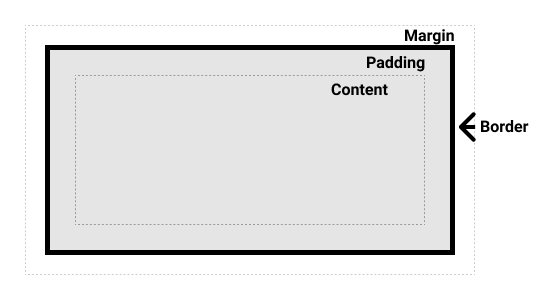
*Image from [MDN](https://developer.mozilla.org/en-US/docs/Learn/CSS/Building_blocks/The_box_model/box-model.png)*
Read more about standard and alternative box models on MDN [here](https://developer.mozilla.org/en-US/docs/Learn/CSS/Building_blocks/The_box_model#what_is_the_css_box_model).
### CSS Specificity
It defines which CSS property values will be applied to an element when there are multiple CSS selectors targeting the same element.
We have all been in a state where we tried adding certain CSS rules and to our surprise the property values were not applied to the element. And then `!important` to the rescue.
> Using `!important` has its purposes (though I struggle to think of them), but it's much like using a nuclear explosion to stop the foxes killing your chickens; yes, the foxes will be killed, but so will the chickens. And the neighbourhood." - [David](https://stackoverflow.com/a/9245360/2738966)
The answer is CSS specificity.
Read more about it on MDN [here](https://developer.mozilla.org/en-US/docs/Web/CSS/Specificity) and a nice visualization at [cssspecificity.com](https://cssspecificity.com/).
### Event bubbling and capturing
These are two phases of event processing.
#### Bubbling
When event happens on an element, the handlers on that element are run first, then on its parent, then on its grandparent, and so on until it reaches `html` element.
#### Capturing
When event happens on an element, the handlers on the outermost ancestor `html` element are run, then the element inside it, and so on until it reaches the element where event happened.
All event handlers are registered for the bubbling phase by default.
Read more about it on MDN [here](https://developer.mozilla.org/en-US/docs/Learn/JavaScript/Building_blocks/Events#event_bubbling_and_capture) and see it in action at [domevents.dev](https://domevents.dev/).
It is also worth understanding - [How event delegation works](https://davidwalsh.name/event-delegate).
### Array methods
There are numerous fundamental concepts in JavaScript that should be understood. However, understanding array methods and how to use them correctly is essential.
The entire list of instance methods is available at MDN [here](https://developer.mozilla.org/en-US/docs/Web/JavaScript/Reference/Global_Objects/Array#instance_methods).
Know the difference between `map` and `forEach`. I have recently discussed about it [here](https://blog.niranjanborawake.in/when-not-to-use-array-prototype-map).
Know the difference between `filter` and `find`.
That's it. Knowing these things will make you more confident when working on building web sites.
### What's your list of 5 important things?
*Cover Photo by César Couto on Unsplash*